Power Apps Guide
November 5, 2026 24 min read

Microsoft Power Apps for Businesses in the Netherlands: A Practical Guide to Building Better Business Applications

When spreadsheets stop being enough, what a custom business application actually changes, where Power Apps fits alongside the systems you already run, and what a realistic implementation looks like for a Dutch business.

Three colleagues collaborating on a project, analyzing data on a laptop in a bright, modern office environment

Most businesses do not decide to build an application. They discover that a spreadsheet has quietly become a business-critical system.

It starts reasonably. One file tracks project status. Another records equipment. A third holds the employee training matrix. Someone adds a tab for approvals because email was getting messy. Six months later, three people maintain versions of the same file, nobody is entirely sure which one is correct, and the person who built it has changed roles.

The information exists. The process works, in the sense that things eventually get done. But the effort required to keep it accurate grows every month, and the business becomes dependent on individual habits rather than a system that anyone can pick up.

Microsoft Power Apps is Microsoft's low-code platform for building business applications around the processes an organisation actually runs. This guide is about the business decision rather than the product tour. It covers when a spreadsheet has reached its limit, which business processes are worth turning into an application, how to choose between the two app types, what to consider around security and licensing, and how a realistic implementation is approached.

This guide is written for business owners, operations and department managers, and IT decision-makers in the Netherlands who are working out whether Power Apps is the right answer to a process problem, and what it takes to deliver something people actually use.

If you already know you need application development delivered rather than explained, the Power Apps development service page covers our capabilities, delivery process and technical approach in detail. This article is the broader, independent guide behind it.


1. When business processes outgrow existing tools

Spreadsheets, email and general-purpose software are not the problem. They are often the correct starting point, and many businesses would be worse off without them. A spreadsheet lets a team get organised on the same day the need appears, without a budget, a project or a supplier.

The difficulty arrives when a tool that was chosen for convenience becomes responsible for something important. A project plan that management relies on. A stock file that determines what gets reordered. A training matrix that supports a compliance audit.

At that point the question is no longer whether the tool works. It is whether the business can keep relying on it.

How the role of a spreadsheet changes as a business grows
Stage The spreadsheet is used for Where it starts to strain
Early A calculation, a list, a one-off analysis Nothing. This is what spreadsheets are for.
Growing Shared tracking, recurring reporting, several contributors Versions multiply, ownership becomes unclear
Critical An operational process the business depends on No audit trail, no access control, fragile formulas, single point of failure
Outgrown Still the same file, but now surrounded by workarounds The workarounds are the real process, and nobody documented them

The last row is the one that matters. By the time a business starts looking for a better application, the spreadsheet is rarely the only problem. It has usually accumulated a small ecosystem of related files, email threads and informal agreements that together perform the job of a system, without any of the characteristics of one.

Common signs that a process needs a proper application

Information sits in several places

Completing a routine task means switching between a spreadsheet, an email thread, a shared folder and a separate system. Nobody can point to one place that holds the current answer.

The same data is entered more than once

A customer, project or employee is recorded in two or three systems. Each additional entry is a chance for the records to disagree, and eventually they do.

Approvals live in the inbox

Requests and decisions are spread across email. Establishing what is outstanding means searching, asking, or trusting memory. There is no reliable status anyone can check.

Managers cannot see status without asking

Operational visibility depends on someone compiling an update. By the time the report exists, it describes where things stood last week.

Teams do the same thing differently

Each department has its own version of a process that should be standard. Comparing results across teams becomes guesswork, and improvements cannot be applied everywhere at once.

Software does not match how the work flows

Packaged software covers most of the process. The remainder is handled through manual workarounds that quietly become permanent.

The objective is not to remove every spreadsheet. It is to identify the two or three processes where existing tools are now creating avoidable work, and decide whether a dedicated application would serve the business better.

2. The hidden costs of disconnected business processes

Disconnected processes rarely show up as a line item. There is no budget category called "time spent looking for the right version of a file". The cost is distributed across many people in small amounts, which is precisely why it goes unchallenged for so long.

When a business does examine it, the same categories tend to appear.

Where the effort goes

Six costs that disconnected processes create

Searching

Time spent locating information, confirming which version is current, and asking colleagues where something was recorded

Re-entering

The same data captured in several places, plus the correction work when those records no longer agree

Chasing

Following up on requests and approvals that have no visible status, and re-sending things that were missed

Recompiling

Recurring reporting that involves manually combining figures from several files before anyone can interpret them

Errors

Out-of-date figures, conflicting records and decisions taken on information that was already superseded

Dependency

The process only works while specific people are available, because the knowledge of how it really runs was never written down

These costs are not usually large individually. They become significant because they recur every week, across every team, and they grow as the business does.

There is a second cost that is harder to see. When a process depends on individual habits, it cannot be reliably improved. Attempting to change the way approvals work means changing what several people do in their inboxes, and the change does not survive a busy month.

This is why so many process improvement initiatives stall. The intent is sound, but there is no shared mechanism to hold the improvement in place. A structured application gives the new way of working somewhere to live.

The real question is not how much time is being lost. It is whether the business can improve a process that only exists in people's habits.

A useful way to test the case

Take the process you are considering. Ask how a new employee would learn it from scratch. If the honest answer is "someone would show them", the process is undocumented and depends on transfer of habit. That is usually the strongest argument for a proper application, more than any estimate of hours saved.

3. How Microsoft Power Apps helps businesses build better applications

Microsoft Power Apps is a low-code application development platform within Microsoft Power Platform. It is used to build business applications that connect to existing data, support a defined process and give employees a structured way to do their work.

Low-code means that a significant part of the application is assembled through visual tools, configuration and reusable components rather than written entirely from scratch. It does not mean the application is simplistic. It means the effort goes into modelling the process and the data, rather than rebuilding standard elements every time.

What that changes for a business is not the technology so much as the economics. An application that would previously have been too specific to justify a custom software project becomes viable, because the investment required to build it is proportional to the process it supports.

What changes

Before and after a process becomes an application

Process in files and email

  • Records live in several files
  • Access is granted by sharing a file
  • Status is established by asking
  • Rules exist in people's memory
  • History is whatever was not overwritten

Process as an application

  • One system of record for each item
  • Access follows role, not file sharing
  • Status is visible and current
  • Business rules are enforced by the app
  • Activity is logged and traceable

The shift is from a process that depends on who is involved to one that depends on how it is configured.

Two ways to build an application

Power Apps supports two application models. The distinction matters early, because it shapes the data design, the effort required and how the finished application feels to use. Section 5 covers the choice in detail.

Canvas apps

The application interface is designed screen by screen. Well suited to task-focused applications, mobile data capture and experiences shaped around how a specific job is done.

Model-driven apps

The application is generated from a business data model in Dataverse. Well suited to record management, connected data and processes with defined stages and relationships.

What businesses build with it

4. Business processes you can improve with Power Apps

The strongest reason to build an application is not that the organisation needs another tool. It is that a specific process could work better. The following examples are the patterns that come up most often in Dutch mid-sized and enterprise operations.

Project and task management

Project information spreads across planning documents, spreadsheets, email and one or two task tools. Status updates are requested by email, and each project manager reports slightly differently.

A dedicated application holds tasks, ownership, progress, issues and deadlines in one place, shaped around the organisation's own project stages rather than a generic methodology. Managers see progress without asking for it.

What changes in practice

  • Clear ownership of each task
  • Status visible without a status meeting
  • One definition of what "complete" means
  • Issues recorded where they can be acted on
See the Project Management Platform demonstration

Inventory and asset management

Businesses managing stock, equipment or tooling need to know what they have, where it is and whether it is available. When this lives in spreadsheets or paper forms, the record drifts away from reality almost immediately.

A Power Apps solution provides a structured way to record movements, update locations and report condition, often usable on a phone or handheld device at the point where the activity happens.

What changes in practice

  • Records updated where the work happens
  • Fewer separate tracking files
  • Asset history rather than current state only
  • Integration with existing inventory or ERP data
Warehouse worker in a safety vest scanning a box with a tablet to update stock records on the spot
The difference is not the scanner. It is that the record is written once, at the shelf, by the person holding the item, instead of being re-keyed at the end of the shift.

Employee and skills management

Skills, certifications, training records and availability are often held in spreadsheets that are updated by one person and trusted by everyone else. When that person is unavailable, no one can confirm who is qualified to do what.

A centralised application records capabilities, qualifications and development needs in a structured way, and supports workforce planning decisions without a manual audit.

What changes in practice

  • One authoritative skills record
  • Certification expiry visible before it lapses
  • Gaps identified before they affect delivery
  • Training evidence available for audits
See the Skills Management Platform demonstration

Internal requests and approvals

Requests arrive by email, are forwarded to whoever is believed to be responsible, and are followed up by asking. Nobody can say with confidence how many are open or how long they take.

A request application standardises submission, assignment, review and completion. Combined with Power Automate, notifications, reminders and multi-stage approvals happen without manual coordination.

What changes in practice

  • Requester can check status themselves
  • Approval history recorded automatically
  • Fewer follow-up emails
  • Volume and cycle time become measurable
Workflow automation services

Production and operational management

Production and operations teams collect information from paper forms, spreadsheets and existing systems, then reconcile them later. Issues are reported verbally and recorded inconsistently, if at all.

A tailored application captures operational updates and exceptions as they happen, and feeds reporting without a separate compilation step.

What changes in practice

  • Operational data recorded at source
  • Exceptions visible while they can still be fixed
  • Consistent data across shifts and sites
  • Reporting built on live data
See the Production Management demonstration

These patterns are not industry specific. Manufacturing, logistics, distribution, professional services and public sector operations all run variants of the same underlying processes: capture information consistently, route it to the right person, and make the result visible.

5. Canvas apps vs model-driven apps: which approach is right?

This is the decision that most often gets made too quickly. It is also the one that most affects how much effort the application takes to build and maintain, and how well it holds up as requirements change.

The two app types are not better or worse versions of each other. They start from different places. A canvas app starts from the interface and works towards the data. A model-driven app starts from the data model and generates the interface from it.

Comparison

Choosing between the two app models

Consideration Canvas apps Model-driven apps
Starting point The user interface The data model
Interface control Full control, designed screen by screen Generated from tables, forms and views
Data sources Many supported sources, including SharePoint, SQL and Dataverse Microsoft Dataverse
Best fit Task-focused tools, mobile capture, tailored workflows Record management, connected data, staged processes
Responsiveness Must be designed and tested for each device Provided by the platform
Effort as scope grows Rises with each additional screen and scenario Reuses the data model across new views and processes
Security depth Depends on the underlying data source Role-based, record-level through Dataverse
Many real solutions use both. A model-driven app can hold the structured record and process, with a canvas app providing a focused mobile experience for one specific task.

How to decide in practice

Choose canvas when the task is the point

If employees need a purpose-built screen for a specific activity, such as a site inspection or a shift handover, and the data behind it is secondary, a canvas app is usually the more direct route.

Choose model-driven when the relationship is the point

If the value comes from connected records, defined stages and consistent security across many users, a model-driven app will usually be more maintainable as scope grows. Building the same thing in canvas means rebuilding structure the platform would otherwise provide.

Do not choose based on build speed alone

A canvas app can appear faster to produce for a simple requirement. If that requirement then grows into record management with roles and reporting, the accumulated design decisions can become expensive. The right question is what the application is expected to become, not how quickly the first version can be demonstrated.

Read the full Canvas vs Model-Driven guide

6. Connecting Power Apps with Power Automate, Power BI and Dataverse

An application becomes considerably more useful when it is part of a connected process rather than an isolated tool. That is the practical point of the wider Power Platform: four services that each do one thing well and hand off to each other.

The important thing to understand is that not every solution needs all four. A single canvas app with a SharePoint list behind it may be entirely sufficient. The architecture should follow the process.

How the four services fit together

A request process, from submission to reporting

Employee submits a request

Through a canvas app on desktop or mobile

Power Apps

Validates the request and enforces the required fields

Dataverse

Stores the record with relationships, rules and security

Power Automate

Notifies the approver, escalates if unanswered, updates related systems

Manager approves

Decision is recorded against the record, not in an inbox

Power BI reports across all requests

Volumes, cycle times, bottlenecks and outstanding items, refreshed from the same data

Each service stays responsible for one thing. Power Apps handles the interaction, Dataverse holds the data, Power Automate moves the process forward, and Power BI reports on the result.

Power Apps

The interface employees use. Shapes how information is captured and how a task is completed.

Power Automate

The workflow behind the application. Sends notifications, requests approvals, updates other systems and handles reminders.

Power BI

Turns the collected data into dashboards and reports, so managers can see performance rather than request an update.

Microsoft Dataverse

A structured data platform with tables, relationships, business rules and security. Not always required, but valuable when records relate to each other.

Dataverse is not compulsory. SharePoint, SQL Server or another supported data source is often the right choice for a straightforward application. Introducing Dataverse adds capability and licensing, so it should be justified by the data model rather than assumed.

7. Practical Power Apps examples for business operations

Describing an application in the abstract is not very useful. What helps is seeing how a real one is structured around a real process.

FlexiSolution has built three platform demonstrations that show how tailored business applications can look in practice. They illustrate design decisions rather than reporting client results, and they are presented here as examples of approach.

Meeting, women and business people with laptop in office, investment project and discussion. Teamwork, accountant and financial advisor with feedback for finance update, report review and documents
Business applications are shaped around the way a team already works, not around a generic template.

Commercial Operations Platform

Platform demonstration

Commercial information is commonly spread across separate spreadsheets, with each team maintaining its own view of projects, budgets and responsibilities. Management ends up reconciling those views before decisions can be made.

This demonstration shows how commercial information and operational tracking can be brought into a single application, with a shared structure for projects, ownership and status.

Business challenge illustrated

Maintaining visibility of commercial activity when the underlying information lives in disconnected tools.

Explore the Commercial Operations Platform

Project Management Platform

Platform demonstration

Project information is organised around tasks, timelines, responsibilities and progress, so employees and managers work from a shared environment rather than separate spreadsheets and verbal updates.

The structure reflects the organisation's own delivery stages, which is the part a generic project tool usually cannot accommodate.

Business challenge illustrated

Maintaining consistent project information and understanding progress across multiple activities and owners.

Explore the Project Management Platform

Skills Management Platform

Platform demonstration

Employee skills, qualifications and workforce information are organised in a dedicated application, replacing fragmented records with one structured source.

This makes workforce capability visible enough to support planning decisions and identify development needs before they affect delivery.

Business challenge illustrated

Maintaining consistent and accessible information about workforce skills, certifications and development requirements.

These are demonstrations of design approach, not claims about completed client implementations. Every organisation needs its own assessment of processes, data and requirements before a suitable solution can be designed.

8. Power Apps vs Excel, off-the-shelf software and custom development

Power Apps is one option among several, and recommending it for every requirement would be as unhelpful as dismissing it. What matters is matching the tool to the problem.

Power Apps vs Excel

Excel is excellent at calculations, modelling and analysis. It is less well suited to being the shared operating system for a multi-user process, where the requirements are access control, consistent entry, workflow and history rather than computation.

The goal is not to eliminate spreadsheets. Most businesses will keep using them for planning and analysis long after an application is in place. The goal is to stop using them for coordination they were never designed to carry.

Power Apps vs off-the-shelf software

Packaged software is often the right answer, particularly for well-defined domains such as accounting, HR administration or payroll. Buying is faster and carries less delivery risk.

The trade-off appears when the organisation's process is genuinely a differentiator, or when several packages each cover part of a process and none covers the joins. That gap is where tailored applications earn their place.

Power Apps vs traditional custom development

Traditional development suits applications with complex or high-performance logic, unusual architecture, or requirements that the platform cannot reasonably express.

For internal process applications, Power Apps is usually the more proportionate investment, and it inherits Microsoft identity, security and integration without being built from nothing.

Fit by requirement

Which option suits which requirement

Requirement Excel Off-the-shelf Power Apps Custom build
Calculations and analysis Strong Unnecessary Unnecessary Unnecessary
Standard business domain Possible Strong Workable Overstated
Company-specific process Limited Depends on product Strong Strong
Multi-user access control Weak Depends on product Strong Strong
Microsoft 365 integration Available Depends on product Strong Requires building
Specialist or high-volume logic Limited Depends on product Depends on platform Strong
A common and sensible outcome is a combination: packaged software for standard domains, a Power Apps application for the company-specific process around it, and spreadsheets for analysis.

9. Security, integrations, governance and scalability

Business applications hold employee data, customer records, commercial information and operational detail. Security is therefore a design consideration from the start, not a configuration step at the end.

Microsoft provides the underlying capabilities through the Power Platform and Microsoft Entra ID. What those capabilities deliver depends entirely on how the solution is designed.

Access and permissions

Define who can open the application, which records they can see and which actions they can take. Dataverse supports role-based security with record-level control where the process requires it. An application that shares a file with a team has no equivalent.

Data protection and DLP

Data Loss Prevention policies at the tenant level control which connectors may be combined and how business data can move between services. This matters more as more people begin building with the platform.

Environments

Development, test and production environments should be separated so that changes are validated before reaching the people who depend on the application during the working day.

Integration

Power Apps connects to Microsoft 365 and SharePoint, Dataverse, SQL Server and Azure SQL, Dynamics 365, and external systems through connectors and APIs. Integration design must settle a question that is easy to skip: which system owns each record.

Governance and ownership

As the number of applications grows, the organisation needs to know who owns each one, how it is supported, which data sources it depends on and how changes are released. Without this, a useful application becomes an undocumented dependency.

Scalability

An application that works for one team may need review before it is extended to several departments or locations. Data architecture, connector limits, performance and licensing all deserve a second look as usage grows.

Integration ownership

Deciding which system is the source of truth

Owned by ERP

Financial postings, purchase orders, supplier master data, stock valuation

Owned by the app

Requests, approvals, task status, inspection results, activity history

Needs a decision

Customer contact details, project budgets, equipment registers, reference data

The middle column is where most integration problems begin. Duplicate ownership looks harmless until the two records disagree and neither system is obviously correct.

Related service: Governance and Security

10. Power Apps licensing and implementation costs

Licensing is where Power Apps business cases most often go wrong, usually because it is assessed after the design rather than alongside it.

Some Microsoft 365 subscriptions include limited Power Apps usage rights, typically for standard connectors and supported Microsoft 365 data sources. Applications that use premium capabilities generally require additional licensing.

What drives the licence requirement

Design decisions that change the licensing picture

Premium connectors

Connecting to SQL Server, external APIs or third-party business systems generally moves the solution beyond standard usage rights

Dataverse

A powerful data platform, but it changes both the capability and the licensing position compared with SharePoint or another included source

Custom connectors and APIs

Often the right technical answer for an integration, with licensing implications that should be confirmed early

On-premises data gateways

Reaching on-premise systems, which many Dutch organisations still run alongside cloud services

Number and type of users

App makers and end users may be licensed differently, and the user population is usually larger than the project team expects

Licensing terms change. Confirm the current position against Microsoft's official licensing documentation before committing to a solution design.

The five cost components to budget for

Application development

Requirements, design, build, test and deployment effort

Microsoft licensing

Licences for makers and end users, based on the capabilities used

Integration work

Connecting existing systems, often underestimated in scope

Maintenance and support

Ongoing management, issue resolution and incremental change

Training and adoption

Helping employees understand and use the new application, which determines whether the investment returns anything at all

A solution should be judged on the value it returns to the process, not on the initial development figure alone. The cheapest application is the one nobody uses.

11. How to approach a successful Power Apps implementation

A Power Apps project should begin with the process, not the platform. The most common failure is not a badly built application. It is a well-built application for a process nobody agreed on.

Implementation path

Six stages from business challenge to supported application

  1. Identify the challenge

    What is creating avoidable work, and why does it matter

  2. Understand the process

    Map how it really runs, including the workarounds

  3. Define requirements

    Users, data, rules, integrations and reporting

  4. Design the solution

    App type, data sources, security and integrations

  5. Develop and test

    Built in stages, tested with the people who will use it

  6. Deploy and support

    Training, ownership and ongoing improvement

Stages two and three carry most of the risk. Teams frequently skip to four because designing the application is the more interesting part.

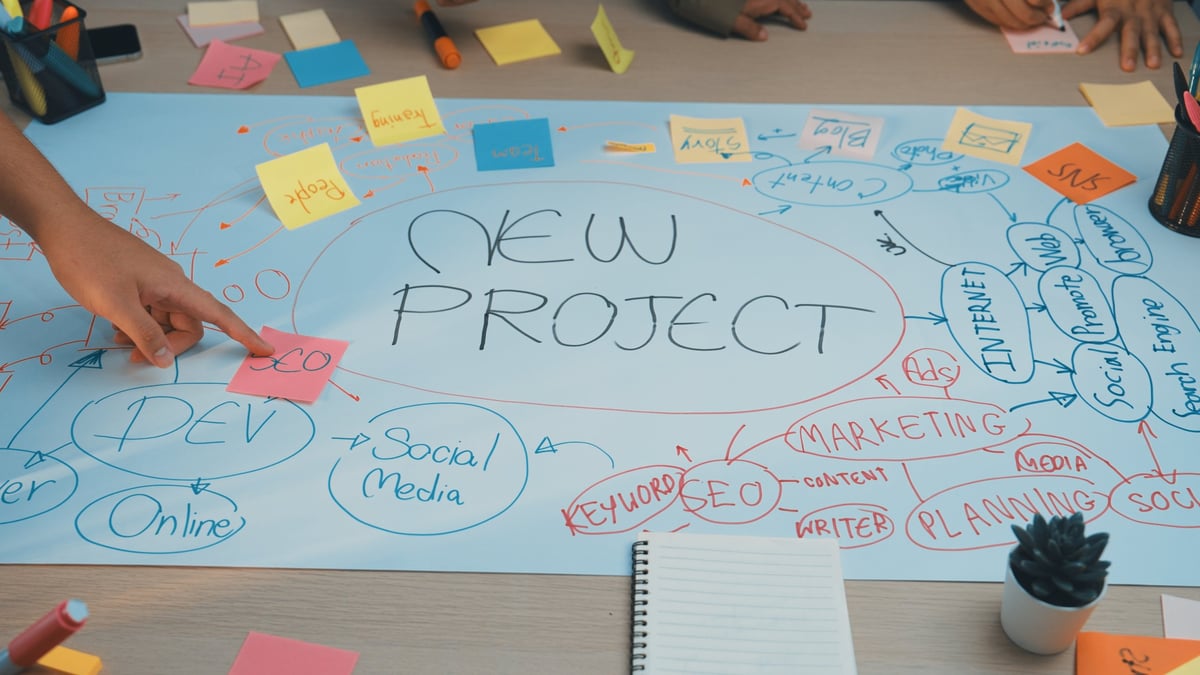
Colleagues mapping a business process with sticky notes and diagrams on a whiteboard during a discovery workshop
Discovery is the only stage where changing your mind is still cheap. By the time a data model exists, a missed approval step costs a rebuild rather than a conversation.
1

Identify the business challenge

Be specific about what is not working. "Too much manual work" is not a problem statement. "Commercial project status takes two days to compile because it lives in four spreadsheets" is one you can design against.

2

Understand the existing process

Map the process as it actually operates, not as the process documentation describes it. Include the informal steps, because they are usually where the real behaviour lives.

This stage also reveals whether an application is the right answer. Some problems are caused by an unnecessary approval step, and removing it costs nothing.

3

Define the requirements

Establish what the application must accomplish before deciding how to build it:

  • Who uses it, and in what context
  • What information must be captured
  • Which activities must be supported
  • What rules and approvals apply
  • Which systems must be connected
  • What management needs to see
4

Design the solution

This is where the canvas versus model-driven decision, the data source, the security model and the integration approach are settled. Getting these right early is what keeps the application maintainable two years later.

5

Develop and test

Build in stages and demonstrate working versions early. Test usability, data accuracy, permissions and integrations with real users before the wider rollout, not after.

6

Deploy and support

Employees need to know how to use it, who owns it and where to go when something is wrong. The application should be reviewed as requirements change, not treated as finished on the go-live date.

12. Choosing the right Power Apps development partner

The platform is not usually what determines whether a project succeeds. The partner is. A capable team can build a poor application for the wrong problem, and a modest team can deliver something genuinely useful if the problem was understood properly.

When evaluating a Power Apps partner, these are the questions worth asking.

Business understanding

Can they describe your process back to you accurately, and identify the problem before proposing technology?

Solution architecture

Can they make and defend decisions about data sources, app type, security and integration?

Microsoft ecosystem knowledge

Do they understand how Power Apps works with Power Automate, Power BI, Dataverse and the Microsoft 365 environment you already run?

Practical evidence

Can they show working applications that solve recognisable business problems, not just screenshots of dashboards?

Long-term support

Will they maintain, document and adapt the application as the business changes, or disappear after go-live?

Clear communication

Can they explain technical trade-offs in business terms, including what they would not recommend?

A question worth asking directly

"When would you advise us not to build an application?" A partner with genuine business understanding will have an answer. One who does not will propose an application regardless of the problem.

How FlexiSolution approaches this work

At FlexiSolution, we start from how an organisation actually operates, where processes create avoidable complexity and what would need to change for the work to be easier.

For Power Apps projects this means looking past the application interface to the information behind it, the process it supports, the systems it must connect to and how it will be maintained. As a Microsoft Partner, we combine business process understanding with application development, systems integration, data and automation.

Our focus is on applications that help a business work better, not on adding more software to the environment.

13. Frequently asked questions about Microsoft Power Apps

The questions that come up most often when Dutch businesses evaluate Power Apps.

14. Building applications around the way your business works

No business should have to depend on disconnected spreadsheets, manual re-entry and email approvals for its important operations. Those tools were the right answer when the process was smaller. The question is whether they are still the right answer now.

Microsoft Power Apps makes it practical to build an application around a specific process at a proportionate cost. But the platform is not the starting point. The starting point is knowing which process is creating avoidable work, and what would need to be true for it to stop doing so.

Three questions usually reveal whether an application is the right investment.

  1. Which process is creating the most avoidable work? Not the largest or the most visible, but the one where effort is clearly wasted every week.

  2. Would a single source of information change how decisions are made? If access to current, consistent information would change behaviour, an application will earn its place.

  3. Could the process be described to a new employee without someone demonstrating it? If not, the process currently lives in habits rather than design, and that is the strongest case for building something.

Discuss your Power Apps requirements

FlexiSolution helps organisations in the Netherlands assess business processes and build Microsoft Power Apps solutions around them. If your team is managing important activities through spreadsheets, email and disconnected tools, we can start with the process and work out what is genuinely worth building.